3D for the Web: Interactive 3D animation using 3ds max, Flash and Director

Let us build on what we have learned to make a turtle button. This little chap will pop out of his shell when the mouse hovers over him, and when the mouse is clicked, turn into road kill.
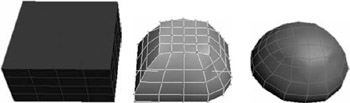
The turtle is pretty easy to build using the Sub-Object mode. It also introduces a few ideas about Materials in 3D. Like so many 3D objects we will start by creating a Box. Create a Box with four segments in every direction.
| Note | We could build the turtle from half a sphere but there are three things I wish to demonstrate by modeling from a box. Firstly that by good manipulation at Sub-Object mode, round objects can be created, secondly that the topology of your finished mesh can be crucial for materials, and thirdly it is good practice to keep the polygon count down, and the pole of a sphere has far too many polygons for our needs. |
Convert your box to an Editable Mesh and choose Vertex Selection. The vertices will light up blue. By marquee-selecting vertices, we are going to start creating the turtle shell. In front or side view, select the top layer of vertices and use the Scale tool to pull them together. Now use the top view to bring in the corners to something more like an egg shape. Keep moving the vertices till you have a good-looking hemisphere (Figure 1.22).