Apple Aperture 2: A Workflow Guide for Digital Photographers
Including clear explanations and step-by-step guidance, this book shows you the best way to import, organize and enhance your images for ease of management and high quality results.
 TABLE OF CONTENTS
 Aperture uses folders. Albums, Smart Albums and Projects for organizing your images, and it's not immediately clear how each works; the differences are subtle (Fig. 2.24).
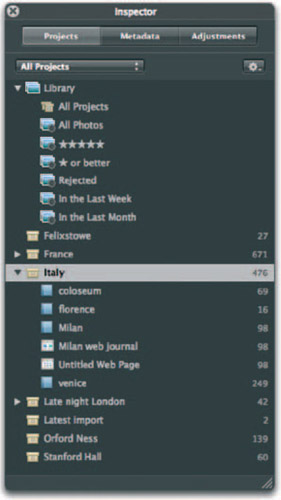
Folders work in exactly the same way as they do in the Finder, and look like the Mac OS X equivalent. They are blue tabbed containers for the other files and collections in your Aperture Library. However, they can only contain Albums, Smart Albums, other folders and Projects; not images themselves. As such, think of them as handy dividers, or bookmarks that let you skip to a particular collection.
Their use is solely to keep related work together, and to allow you to collapse long lists of elements so that they take up less space in the Project panel. They are your only navigational tool-as opposed to search and indexing tool - so maximise their potential by using sub-folders inside main folders. For example, a Europe folder may contain Projects for Hungary, Spain and France; sub-folders for Paris, Lyon and Marseilles inside France; and further sub-folders for architecture, churches and people inside the Paris folder. You can now expand and contract each one, thus navigating through your folder structure without having the Project pane so long that it scrolls off the bottom of the screen.