Apple Aperture 2: A Workflow Guide for Digital Photographers
Including clear explanations and step-by-step guidance, this book shows you the best way to import, organize and enhance your images for ease of management and high quality results.
 TABLE OF CONTENTS
Aperture is part of Apple's Pro application lineup, where it sits beside Final Cut Studio, Logic and Shake. As such, it sports the distinctive dark interface that Apple uses for these products, and works best on high resolution displays as it adopts a smaller on-screen font and a range of complex panels and palettes. It's even better when spread across two screens, where the management and editing workspaces will be separated out from each other and your pictures will have room to breathe (Fig. 2.1).
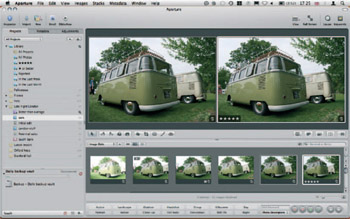
The interface is split into resizable areas dedicated to specific tasks, such as Project management, image editing, photo browsing and viewing at larger sizes. Each one is contained within the Aperture application interface rather than spun off as a separate panel as things are in Photoshop. This follows the methods used in Final Cut Studio, iTunes and iPhoto. There are exceptions, however, in the form of head-up displays (HUDs)and the innovative full-screen mode. When running in full-screen. Aperture hides its rigid gray interface and instead adopts a black background to better show off your photos, and strips at the top and bottom of the display showing, respectively, tools and...