CD and DVD Forensics

Walking readers through all facets of handling, examining, and processing CD and DVD evidence for computer forensics, this how-to book provides tools to open CDs and DVDs in an effort to identify evidence of a crime.
 TABLE OF CONTENTS
 CD/DVD Inspector has a number of options and controls spread out over a number of pages. There are several different types of options available. The following describes each of the various settings that can be changed on each of the pages.
One option on the first page is called Forensic use and controls a significant part of the operation and presentation of CD/DVD Inspector. This option is set by default when CD/DVD Inspector is installed. When this option is not checked, additional pages appear in the User Preferences dialog box (see Figure 6.13).
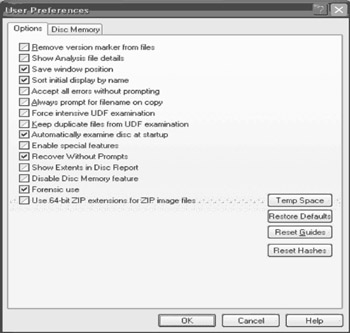
For ISO 9660 file systems, removing version markers from files causes the filenames to be displayed without the ;1 version marker that is normally present. The default is to display the version marker when it is present. Because the version marker is part of the ISO 9660 standard, it is included in most writing software, even though it is not used today.
Because the version marker has no function today, there is no reason to set this option.
Selecting this option causes the Analysis report to include information about specific files rather than just a summary count. This can significantly increase the size of the Analysis report, often by including hundreds if not thousands of files.
It is not recommended that this option be set all of the time; only when it is required.