CD and DVD Forensics

Walking readers through all facets of handling, examining, and processing CD and DVD evidence for computer forensics, this how-to book provides tools to open CDs and DVDs in an effort to identify evidence of a crime.
 TABLE OF CONTENTS
 The Analysis tool is accessed from the Tools menu or the Analysis toolbar. This tool produces a report that can be copied to the clipboard for insertion into a report document. This report is a summary of all of the information found on the disc.
In each of the message descriptions below, italics are used to represent substitutions in the message. By convention, one or more ns represent numeric digits and one or more s s represent a string that is inserted in the message. All of the messages appear in alphabetical order, with alternatives listed with the primary message (see Figure 6.15).
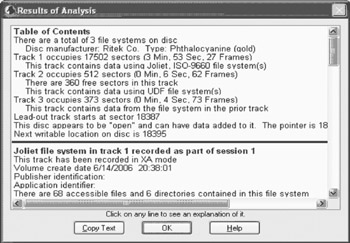
The track is a data track that belongs to the recording session shown. The name is the name of the file system, and is shown as HFS, HFS+, High Sierra, ISO 9660, Joliet, or UDF. This line is displayed in bold at the beginning of the detailed information about a data track.
This message indicates the difference between how many sectors were written and how many sectors the file system occupies. If this number is large, it should be a warning that something may have been added to the end of the file system. This can legitimately occur when a combination of file systems is present in a single track, such...