CD and DVD Forensics

Walking readers through all facets of handling, examining, and processing CD and DVD evidence for computer forensics, this how-to book provides tools to open CDs and DVDs in an effort to identify evidence of a crime.
 TABLE OF CONTENTS
 CD/DVD Inspector can produce a number of different reports regarding the content of the disc being examined (see Figure 6.18). These reports fall into two basic groups: text reports listing the all files on the disc, and image reports showing graphics found on the disc. The following dialog box is presented when the Disc Report menu item is chosen from the Tools menu:
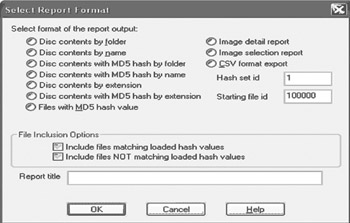
The report choices are divided into two columns, the first for text-format reports that include the full content of the disc, and the second for other formats.
If MD5 hash information is requested it has not yet been calculated for every file, you are prompted to calculate the MD5 hash value for all remaining files. This is a simple way of computing the hash value for every file on the disc all at the same time.
All reports can have their content selected by hash matching. In order to take advantage of this, it is first necessary to load a hash set (e.g., Hashkeeper-style CSV format) into CD/DVD Inspector. This is done via the Load Hash Set selection in the Pro Tools menu. Then files that either match or do not match the loaded hash values can be selected for inclusion in the report.
For the Image Detail report and the Image Selection report, the report title can be specified in the text field near the bottom of the dialog. This title does not apply to...