QuickTime for the Web: For Windows and Macintosh, Second Edition

A comprehensive explanation of QuickTime for every multimedia author.
 TABLE OF CONTENTS
 Before you can do anything with QuickTime, you need to install it. This chapter explains
how to install QuickTime from the CD
how to register and unlock QuickTime Pro
how to set your Internet connection speed
how to configure QuickTime Player
how to get the latest updates over the Internet
As a rule, all this just works. If you have any trouble, see "Appendix B: QuickTime Configuration." It covers
how and when to adjust the QuickTime settings
how to configure the QuickTime plug-in
how to configure your browser
For Windows 95/98/ME/2000/NT
Pentium or compatible processor, 32 MB RAM, SoundBlaster or compatible sound card. Latest version of DirectX recommended.
For the Mac OS
PowerPC processor, 32 MB RAM, Mac OS 8 or later.
Open the plastic flap in the back of the book using a sharp knife, scissors, your teeth, or an entrenching tool. Just don't scratch the CD, chip your teeth, or cut yourself.
Your QuickTime Pro serial numbers are printed on a slip of paper behind your CD.
Put the CD in your computer. Open the Software folder, then the QuickTime folder. Double-click the QuickTime Installer.
Apple's installer lets people save time by downloading only the parts of QuickTime that they need. The choices currently are Minimum, Recommended, and Custom.
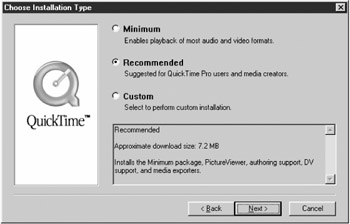
| Important | Since you're installing QuickTime from a CD, you should do a Custom install. Choose Select All to get absolutely everything. (You need everything.) |
You can also use the...