QuickTime for the Web: For Windows and Macintosh, Second Edition

A comprehensive explanation of QuickTime for every multimedia author.
 TABLE OF CONTENTS
 The most fundamental part of using QuickTime on the Web is putting QuickTime movies in a Web page. Later in the book, we'll look at ways to create QuickTime movies of various kinds. We'll also look at ways to achieve striking effects by using QuickTime and HTML. All these things will draw on the basic skills covered in this chapter: getting a QuickTime movie into a user's computer through a Web page.
This chapter covers six topics:
Linking is simple, but a little crude. It uses an ordinary hypertext link, the tag, to link QuickTime content to a Web page.
For example, if your Web page includes the tag
when the user clicks the words Demo Movie, the browser clears the window and loads the movie Demo.mov, centered in the window, with a neutral background. Netscape browsers use a gray background, while Internet Explorer uses white. This window can look a little bleak, especially if all it contains is a sound file. See Link.htm in the Basic folder of the CD for an example. An illustration of a QuickTime movie opened using the tag is shown below:
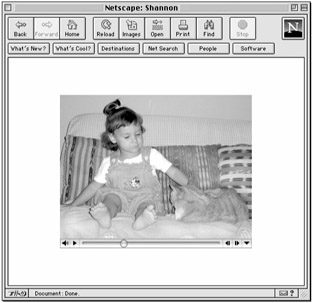
You...