Adobe Photoshop Elements 6 Maximum Performance: Unleash the Hidden Performance of Elements

Project 6: Preserving Shadows

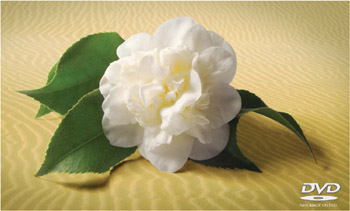
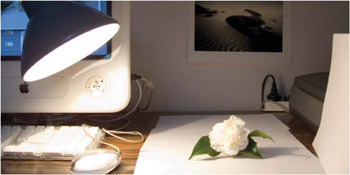
The flower for this project was photographed (using a digital compact) on a cold winter s morning in the temperate hills of Victoria, Australia whilst the sand (shot on Kodachrome film) hails from the Great Indian Desert in Rajasthan. Unlikely bedfellows, but with a little craft the two can lie together comfortably within the same frame but only if the shadow (created by a not-so-subtle 75 watt globe and a couple of pieces of white paper) is captured with all of its subtlety and delicately transplanted to its new home in the desert.


The shadow catcher technique designed to preserve the natural shadows of a subject

Capture your subject against a plain white backdrop. For bigger subjects you just need a bigger backdrop. Professional studio photographers photographing full length models use a curved backdrop that extends from beneath the model s feet to the far wall in one continuous arc. If the white backdrop is to appear white then the backdrop has to be lit as well as the model. The surface should be smooth so the texture of the backdrop is not transplanted along with the shape of the shadow. In this project the white backdrop (a few sheets of printing paper) is separated from the subject using a mask and then placed in the Multiply blend mode to make it invisible. The shadow which is not white blends with the new background.

Botanical Health Warning: The delicate petals of the flower can be cooked, frazzled or fried by the heat...

UNLIMITED FREE
ACCESS
TO THE WORLD'S BEST IDEAS

SUBMIT
Already a GlobalSpec user? Log in.

This is embarrasing...

An error occurred while processing the form. Please try again in a few minutes.

Customize Your GlobalSpec Experience

Category: CRT Monitors
Finish!
Privacy Policy

This is embarrasing...

An error occurred while processing the form. Please try again in a few minutes.