Adobe Photoshop Elements 6 Maximum Performance: Unleash the Hidden Performance of Elements

Project 5: Displacement

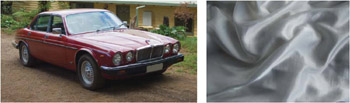
Create a showpiece montage by elevating an old Jag into a classic motor with a little spit and polish and some delectable digital deeds. Wickedly good stuff! The car s paintwork was enhanced before starting the project by increasing the overall saturation of the image and the scratches were removed using the Healing Brush. The tires were made to look like new by using the Burn tool set to 20%. If only it was this easy in real life!


Liquid pixels a displacement, masking and layer style combo

Stage 1 - Creating a Backdrop Using the Displacement Filter

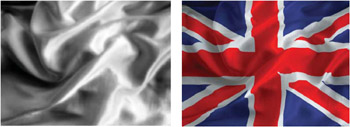
The layer blend modes are an effective way of merging or blending a pattern or graphic with a three-dimensional form. By using the blend modes the flag in this project can be modified to respect the color and tonality of the undulating silk beneath it. The highlights and shadows that give the silk its shape can, however, be further utilized to wrap or bend the flag so that it obeys the material s shape and sense of volume. This can be achieved by using the Displace filter in conjunction with a displacement map . The map defines the contours to which the flag must conform. The final effect can be likened to shrink-wrapping the flag to the 3-D form of the undulating silk.

How it works: The brightness level of each pixel in the map directs the filter to shift the corresponding pixel of the selected layer in a horizontal or vertical plane. The...

UNLIMITED FREE
ACCESS
TO THE WORLD'S BEST IDEAS

SUBMIT
Already a GlobalSpec user? Log in.

This is embarrasing...

An error occurred while processing the form. Please try again in a few minutes.

Customize Your GlobalSpec Experience

Category: Banner and Flag Making Services
Finish!
Privacy Policy

This is embarrasing...

An error occurred while processing the form. Please try again in a few minutes.