Circuit Analysis I with MATLAB Computing and Simulink/SimPowerSystems Modeling
This appendix is a brief introduction to SimPowerSystems blockset that operates in the Simulink environment. An introduction to Simulink is presented in Appendix B. For additional help with Simulink, please refer to the Simulink documentation.
As stated in Appendix B, the MATLAB and Simulink environments are integrated into one entity, and thus we can analyze, simulate, and revise our models in either environment at any point. We can invoke Simulink from within MATLAB or by typing simulink at the MATLAB command prompt, and we can invoke SimPowerSystems from within Simulink or by typing powerlib at the MATLAB command prompt. We will introduce SimPowerSystems with two illustrated examples, a DC electric circuit, and an AC electric circuit
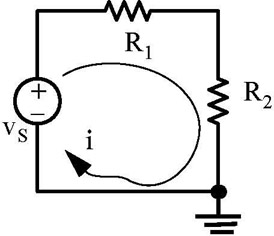
For the simple resistive circuit in Figure C.1, v S = 12v, R 1 = 7 ?, and R 2 = 5 ?. From the voltage division expression, v R2 = R 2 v S/(R 1 + R 2) = 5 12/12 = 5v and from Ohm's law, i = v S/(R 1 + R 2) = 1A.
To model the circuit in Figure C.1, we enter the following command at the MATLAB prompt.
powerlib
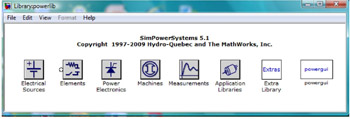
and upon execution of this command, the powerlib window shown in Figure C.2 is displayed.