Dynamic Modeling and Control of Engineering Systems, Third Edition
Appendix 3: MATLAB Tutorial

A3.1 MATLAB OVERVIEW

MATLAB, [1] an interactive and powerful engineering package from The MathWorks, Inc., is one of the most common software tools used in the analysis and design of dynamic systems and the control systems implemented on them. The basic package has many powerful numerical analysis functions as well as the ability to write scripts and functions to aid in repetitive analysis and to allow the user to augment the environment with custom capabilities.

Although it is likely that the reader will have a working knowledge of MATLAB, this tutorial is included to bring the uninitiated reader up to speed and to expose the casual user to several important features that are pertinent to this text. In this tutorial we cover the basic running environment of MATLAB (with its default windows), the fundamental data structure (the matrix), writing scripts and functions, and plotting data. We also explore some capabilities of the Control Systems Toolbox, which has many tools designed to aid in the analysis of dynamic systems. Appendix 4 contains a tutorial for Simulink, a MATLAB add-on, which allows for the rapid development of system simulations.

A3.1.1 Launching MATLAB

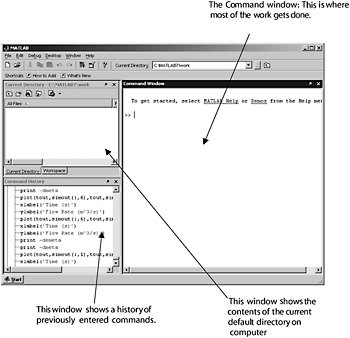
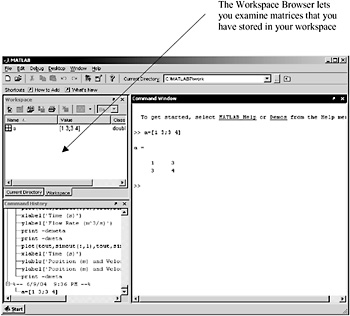
Find MATLAB from the START menu on your computer and launch the application. A3.1 shows the default frame with the three standard windows. The current directory window has an alternative window that you can access by clicking on the tab. A3.2 shows the alternative window and describes its function.


Figure A3.1: The MATLAB window.

Figure A3.2: Alternative windows in...

UNLIMITED FREE
ACCESS
TO THE WORLD'S BEST IDEAS

SUBMIT
Already a GlobalSpec user? Log in.

This is embarrasing...

An error occurred while processing the form. Please try again in a few minutes.

Customize Your GlobalSpec Experience

Category: Web Browsers
Finish!
Privacy Policy

This is embarrasing...

An error occurred while processing the form. Please try again in a few minutes.