Dynamic Modeling and Control of Engineering Systems, Third Edition
Appendix 4: Simulink Tutorial

A4.1 OVERVIEW OF SIMULINK

This tutorial is intended to acquaint the reader with the rudiments of Simulink, [1] the MATLAB add-on that allows engineers and researchers to rapidly develop and run computer simulations of dynamic systems by using a block-diagram-oriented graphical environment. As with the MATLAB environment itself, the Simulink package is a very rich and versatile tool that is constantly developing. The best we can hope to accomplish with this tutorial is to inspire interest and start you on the path to developing a strong competence in the area of computer simulation of dynamic systems.

[1] Simulink is a registered trademark of The MathWorks, Inc.

A4.2 LAUNCHING THE SIMULINK LIBRARY BROWSER

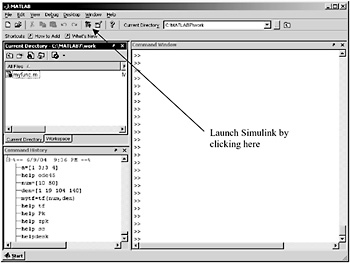
Figure A4.1 shows the default configuration when MATLAB launches in a Windows environment. If Simulink is installed as part of the package, the multicolored icon will appear in the tool bar. The first step in building models is launching the Simulink Library Browser by clicking on that icon.


Figure A4.1: The MATLAB main window.

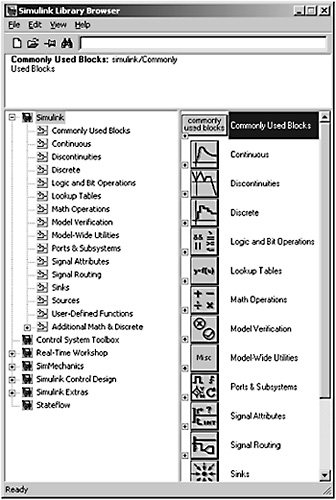
Figure A4.2 shows a typical library browser window. Your installation may look different because the installation of different MATLAB and Simulink add-ons such as the Signal Processing, Artificial Neural Networks, or Fuzzy Logic toolboxes.


Figure A4.2: The Simulink library browser.

A4.2.1 Starting a New Model

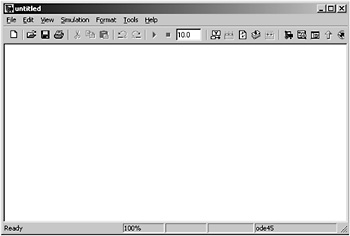
Start modeling in Simulink by clicking on the standard new document icon on the Library Browser toolbar. That opens a new, blank window on your desktop similar to the one shown in Fig. A4.3.


Figure A4.3: New...

UNLIMITED FREE
ACCESS
TO THE WORLD'S BEST IDEAS

SUBMIT
Already a GlobalSpec user? Log in.

This is embarrasing...

An error occurred while processing the form. Please try again in a few minutes.

Customize Your GlobalSpec Experience

Category: Robot Software
Finish!
Privacy Policy

This is embarrasing...

An error occurred while processing the form. Please try again in a few minutes.