Learning Mastercam Mill X Step by Step in 2D
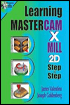
Presenting the contents in a clear and logical sequence without wordy explanations, this unique text presents a thorough introduction to Mastercam Mill X for students with little or no prior experience.
 TABLE OF CONTENTS
 After completing this chapter you will be able to:
State the system requirements for installing Mastercam X
Describe the general process of generating a word address program via Mastercam X
Know the types of files created by Mastercam X
Understand how to start Mastercam X
Describe the nine general elements of Mastercam X s interface window
State how to set the system s working parameters
Understand the basic concepts of Gview, View, WCS, Cplane and Tplane
Know how to use the Help, Save, and Exit commands
One of the most popular CNC software packages available today is Mastercam X from CNC Software, Inc located at 671 Old Post Road, Tolland, CT 06084. CNC Software can also be reached at 860 875 5006 or at their web site www.mastercam.com .
This software has a short learning curve. It presents the user with an easy to follow menu system that works fully with the Windows 00, NT4.0 or higher, ME or XP operating systems. Part geometry can be easily created with Mastercam s CAD package. The CAM package enables the operator to quickly select the part material, machining operations and cutting tools. The software allows the operator to identify the CAD geometry to be selected for a machining operation then quickly generates the required tool path. The operator simply selects the appropriate postprocessor from the system s library and directs Mastercam to generate the corresponding word...