Learning Mastercam Mill X Step by Step in 2D
Presenting the contents in a clear and logical sequence without wordy explanations, this unique text presents a thorough introduction to Mastercam Mill X for students with little or no prior experience.
 TABLE OF CONTENTS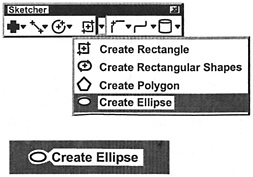
On the CD A full ellipse is created. The operator specifies the X Axis Radius, Y Axis Radius and the center point location. The Start angle is taken as 0 , the End angle as 360 .
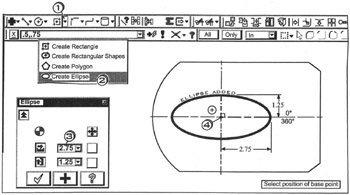
Click  the down arrow
Click 

Click  in the Radius A box
  ; enter
 into the Radius B box
  ; enter
Select position of base point
Click  near the center of the arc
Press  to cancel the function

A full ellipse is created. The operator specifies the X Axis Radius, Y Axis Radius and the center point location. The Start angle is taken as 0 , the End angle as 360 .
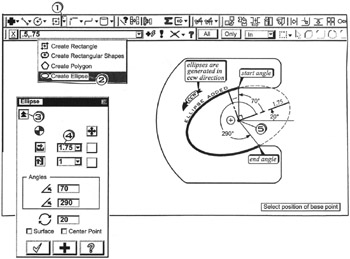
Click the down arrow 
Click 
Click the Expand button 
Click in the Radius A box  ; enter
 into the Radius B box
  ; enter
 into the start angle box
  ; enter
 into the End angle box
  ; enter
 into the Rotation box
  ; enter
Select position of base point
Click  near the center of the arc
Press  to cancel the function