Learning Mastercam Mill X Step by Step in 2D
Presenting the contents in a clear and logical sequence without wordy explanations, this unique text presents a thorough introduction to Mastercam Mill X for students with little or no prior experience.
 TABLE OF CONTENTS
 On the CD The various commands for constructing lines via Mastercam X are presented in this section.
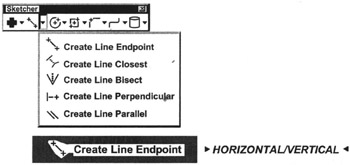
A horizontal or vertical line is created between inputted start and end points. The horizontal line can also be offset a specified distance from the x-axis Similarity the vertical line can be offset a specified distance from the y-axis.
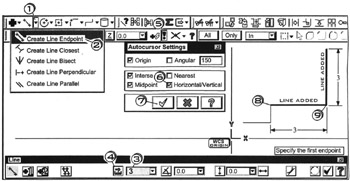
Click  the down arrow
Click 

Specify the first endpoint
Click  in the line length box; enter
Click  on the length button
  to Hard-lock the length field
Click  the Autocursor down arrow
Click  check
check  on for Horizontal/Vertical
Click  the OK button
Click 
 near the start/end locations of the horizontal line
Click 
 near the start/end locations of the vertical line
Press  to cancel the function

A line is created between inputted start and end points
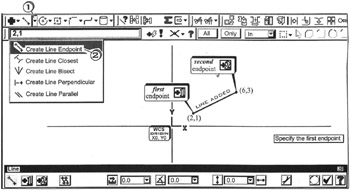
Click the down arrow 
Click 
Specify the first endpoint
Tap the  to activate Fastpoint
Enter 
Specify the second endpoint
Tap the  to activate Fastpoint
Enter 
Press  to cancel the function
| Notes |
|