Learning Mastercam Mill X Step by Step in 2D
Presenting the contents in a clear and logical sequence without wordy explanations, this unique text presents a thorough introduction to Mastercam Mill X for students with little or no prior experience.
 TABLE OF CONTENTS
 On the CD For rectangular coordinates, Mastercam X employs the Cartesian coordinate system for specifying the location of a point in space. This system consists of three directional numbered lines, called axes, that mutually intersect at an angle of 90 . The point of intersection is called the origin. The XY coordinate plane is broken up into four quadrants. Direction is determined as follows:
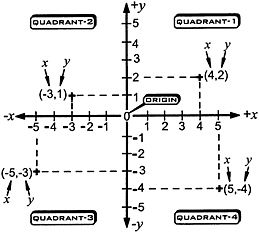
| along the x- axis | numbers to the right of the origin are given a positive (+) sign |
| numbers to the left of the origin a negative( ?) sign. | |
| along the y- axis | numbers above the origin are given a positive(+) sign |
| numbers below the origin a negative( ?) sign |
The location of a point is determined by first entering its signed x-distance, then signed y-distance and finally signed z-distance from the origin.
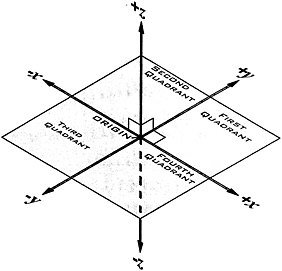
A point is displayed on the screen as the symbol ( ). Points can be used as references to specify locations for subsequent geometric constructions involving lines, circles, arcs, splines, etc
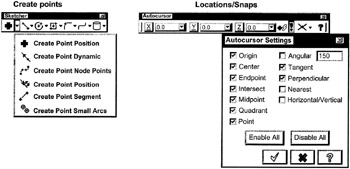

A point is created at any Cartesian (X, Y, Z) coordinates entered.
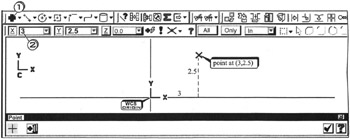
Click  the point position icon
Click  in the X field; enter
Press the  key or
  key; enter
Press  the key twice

Click  the Fast Point icon