Learning Mastercam Mill X Step by Step in 2D
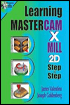
Presenting the contents in a clear and logical sequence without wordy explanations, this unique text presents a thorough introduction to Mastercam Mill X for students with little or no prior experience.
 TABLE OF CONTENTS
 On the CD The commands for constructing arcs(including circles) via Mastercam X are considered in this section
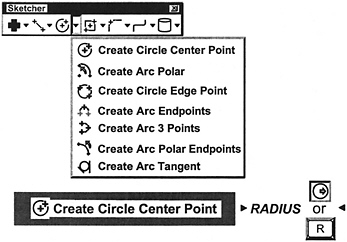
A circle is created by entering its radius and center point values
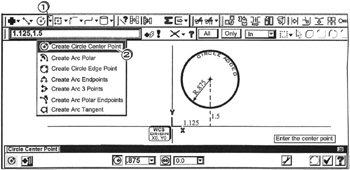
Click  the down arrow
Click 

Enter the center point
Tap the  to activate Fastpoint
Enter 
Tap the  key for Radius
Enter 
Press  to cancel the function

A circle is created by entering its diameter and center point values
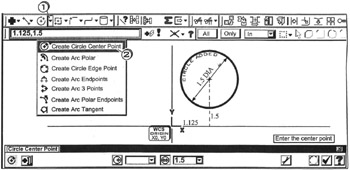
Click the down arrow 
Click 
Enter the center point
Tap the  to activate Fastpoint
Enter 
Tap the  key for Diameter
Enter 
Press  to cancel the function

A circle is created by entering its diameter. Its center point value is entered relative to an existing entity
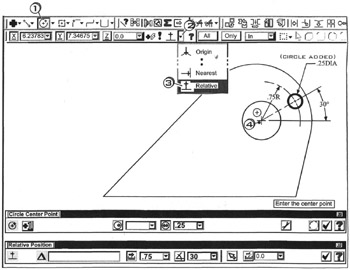
Click the circle center point button 
Enter the center point
Click the down arrow 
Click 

Click  near the center of the circle
. Move the cursor into the ribbon bar on the distance icon  and hold it there..
Tap the  key for Distance
Enter  to
to 
Enter  ;
; 
Tap the  key for Diameter
Enter 
Press  to cancel the function

An arc is created at inputted center point, radius, starting angle and ending angle values.
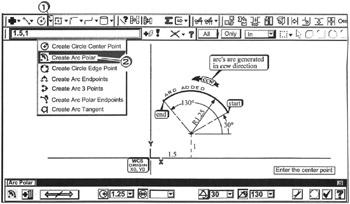
Click the down arrow 
Click 
Enter the...