Mastering Autodesk Architectural Desktop 2007
This Quick Start provides a simple tutorial designed to give you a quick tour of some of the most common objects and features of Autodesk Architectural Desktop 2007 (ADT). You should be able to complete the entire exercise in about 45 minutes. At the completion of this tutorial, you will have experienced a first-hand look at what ADT has to offer.
Experience an overview of the software.
Create your first Architectural Desktop model
Receive a first-hand glimpse at many ADT tools and methods.
Let's get started using ADT right away. For the next several minutes, we will take the "whirlwind" tour of the ADT tool set. All of the tools covered in the following steps use default Architectural Desktop settings. The chapters that follow cover each of these items and settings in detail. This book was authored using Microsoft Windows XP Professional, which is the recommended platform for Architectural Desktop. Basic AutoCAD knowledge is assumed. Please refer to the Preface for complete details on these and other assumptions.
Launch Autodesk Architectural Desktop 2007 from the icon on your desktop.
You can also launch ADT by choosing Start > All Programs > Autodesk > Autodesk Architectural Desktop 2007 > Autodesk Architectural Desktop 2007.
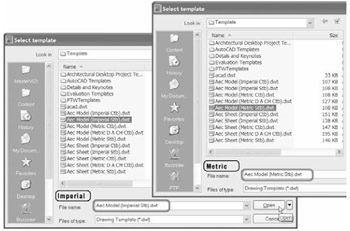
From the File menu, choose New.
Choose the Aec Model (Imperial Stb).dwt [ Aec Model (Metric Stb).dwt] template (see Figure Q-1).
| Note | Throughout this book,... |