Pro/ENGINEER ReferencePoint Suite

Point 3: Generating Drawing Views in Pro/E

M. Veeramani

Pro/Engineer (Pro/E) is a three-dimensional solid modeling software used to design a mechanical system. You create drawing views of solid models to capture the design of the model and communicate it to product manufacturers. This ReferencePoint describes various methods to create, modify, and manipulate drawing views using Pro/E.

The Basics of Creating Views

In Pro/E, you can create a model of an individual element of a mechanical system, called part object, or the entire system, called assembly object, in the three-dimensional environment.

Drawing views of these models capture the design of the model by setting various attributes, such as view scale and view orientation.

Capturing and Communicating the Design Intent

Using Pro/E, you can design a part or an assembly of a mechanical system that incorporates design details, such as machining and welding. These elements constitute the design intent, which needs to be communicated to the manufacturer to manufacture, assemble, or fabricate the mechanical elements. Pro/E drawing objects perform this communication. Using the automated drafting capability of Pro/E, you can create drawing objects or drawings of the 3D models faster with increased accuracy.

Note

To learn more about Pro/Engineer, see the Pro/Engineer as Design Tools ReferencePoint.

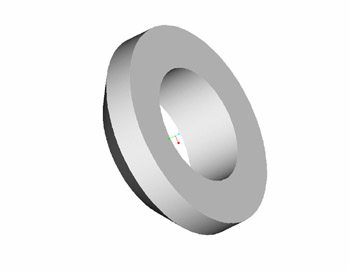
Pro/E uses the part or assembly model to create various views of the model and show design details such as dimensions, symbols, and notes. For example, you can design a washer that is a mechanical fastening element using Pro/E, as shown in Figure 2-3-1:


Figure 2-3-1: A Solid Model of the Design...

UNLIMITED FREE
ACCESS
TO THE WORLD'S BEST IDEAS

SUBMIT
Already a GlobalSpec user? Log in.

This is embarrasing...

An error occurred while processing the form. Please try again in a few minutes.

Customize Your GlobalSpec Experience

Category: Computer-Aided Design (CAD) Services
Finish!
Privacy Policy

This is embarrasing...

An error occurred while processing the form. Please try again in a few minutes.