Pro/ENGINEER ReferencePoint Suite

You can use the Pro/Assembly component of Pro/ENGINEER to create and modify assemblies in a three-dimensional (3D) environment. Using Pro/Assembly, you can create a solid model of assemblies and modify them to meet functional requirements.
This ReferencePoint discusses assembly constraints and methods for creating and modifying assemblies in Pro/ENGINEER. In addition, the ReferencePoint describes the steps to create and modify components in assembly mode, create skeleton models, and package assembly components.
Assembly is the process of joining engineering parts permanently or temporarily to meet the functional requirement of a design. In Pro/ENGINEER, you can use Pro/Assembly to model assemblies to create a mechanism or mechanical structure.
You can invoke Pro/Assembly by creating an assembly object. To create the new assembly object:
Invoke Pro/ENGINEER by running the Proe2001.bat batch file. The Pro/E base window appears.
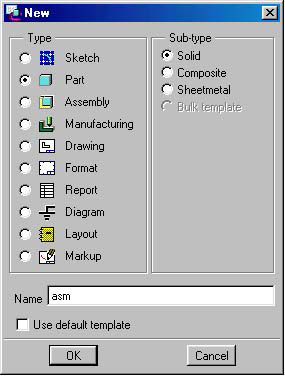
Select File->New. The New dialog box appears, as shown in Figure 2-10-1:
Figure 2-10-1: The New Dialog Box
Choose the Assembly option from the Type group and Solid option from the Sub-type group.
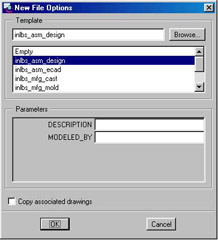
Type the name of the assembly object and click OK. The New File Options dialog box appears, as shown in Figure 2-10-2:
Figure 2-10-2: The New Files Options Dialog Box
Select the required start assembly from the list of start assemblies and click OK. The new assembly object is created.
Whenever you create an assembly object, you need to define its base features, such as datum plane and datum coordinate system. These features are required to assemble the components.