Pro/ENGINEER ReferencePoint Suite

Pro/Welding is a module in the Pro/Engineer (Pro/E) software design package. Pro/Welding is used to create various types of welds on the solid model of an assembly and extract welding information for manufacturing.
This ReferencePoint describes the various weld types that you can create in an assembly. It also explains how you can simulate welding conditions and extract welding information.
Welding is the process to join two metal components or subassemblies. To do this, you apply heat, pressure, or both, or heat and pressure with or without filler material. In most cases, filler material is used to fuse with the metal parts being welded to enable the parts to be welded.
When the welding information is being communicated to a manufacturer to develop a welded assembly, you should provide information pertaining to the weld type, welding rod, weld process, weld location, and the required length of the welding rod.
Pro/Welding simulates welding conditions in a three-dimensional (3-D) environment. The welds are created as surfaces or quilts whose information can be extracted.
To invoke Pro/Welding:
Open the assembly for which you want to create the welding features.
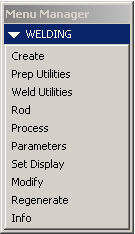
Select Application-> Welding from the drop-down menu. The WELDING Menu Manager appears, as shown in Figure 2-8-1:
Figure 2-8-1: The Welding Menu Manager
Before the weld features are created, you need to define the welding rod and the weld process to simulate the actual welding conditions and extract the...