Advanced Photoshop Elements 6 for Digital Photographers

Tinted Monochromes

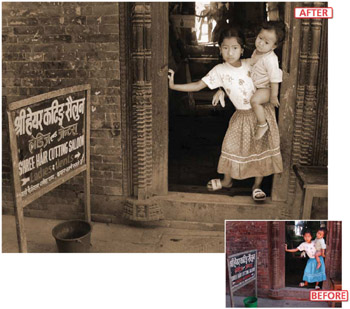
One of the most enduring techniques utilized by photographers the world over is the practice of toning or changing the color of their black and white prints. The Sepia tone (brown) look has come to be linked with quality image production partly because it was a process that increased the longevity of black and white pictures and partly because only committed photographers would take their work through this extra processing step. Digital photographers have the tools at hand to not only tone their black and white images but also to apply this same technique to their color ones.


Toning >> Use the Hue/Saturation control (Enhance > Adjust Color > Hue/ Saturation) to quickly and effectively add a tint to your color images.

6.26 Using Hue and Saturation to tone your pictures

Suitable for Elements 6, 5.0, 4.0, 3.0, 2.0, 1.0 Difficulty level Intermediate Resources Web image 6.26 Related techniques 6.27 Menus used Enhance

The simplest and fastest way to add color is to use the Hue/Saturation control (Enhance > Adjust > Color > Hue/Saturation). This can be applied directly to the whole image or as an adjustment layer (Layer > New Adjustment Layer > Hue Saturation). To change the feature into a toning tool click the Colorize option in the bottom right of the box. The picture will switch to a single color monochrome (one color plus white and black). The Hue slider now controls the color of...

UNLIMITED FREE
ACCESS
TO THE WORLD'S BEST IDEAS

SUBMIT
Already a GlobalSpec user? Log in.

This is embarrasing...

An error occurred while processing the form. Please try again in a few minutes.

Customize Your GlobalSpec Experience

Category: Color Meters and Appearance Instruments
Finish!
Privacy Policy

This is embarrasing...

An error occurred while processing the form. Please try again in a few minutes.