Advanced Photoshop Elements 6 for Digital Photographers

Chapter 8: Professional Retouching

Overview

When it comes to retouching, Photoshop Elements and Photoshop are definitely the royalty amongst image-editors. The programs jointly contain hosts of tools, filters and adjustment options that can help turn ordinary looking portraits into something that is truly dazzling.

The shear power and dominance of the programs in this area is not difficult to see as most glossy magazine covers, family scrapbooks and wedding albums contain a plethora of photos that have been shopped in one way or another. The results, in most cases, are amazing and in a few instances, even a little scary. But for the average photographer (judging by the requests from readers) the interest is not about wanting to recreate the plastic look of celebrity stardom but rather it centers around the gentle art of photo enhancement. And in truth, I feel that this is the best use of the retouching power of programs like Elements.


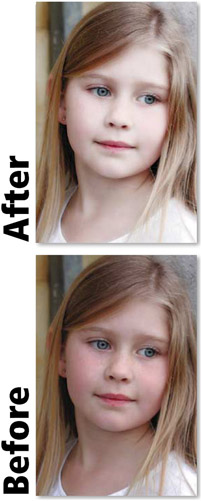
Technique 801: >> Add a dreamlike glow to your portraits using the Dif use Glow f lter.

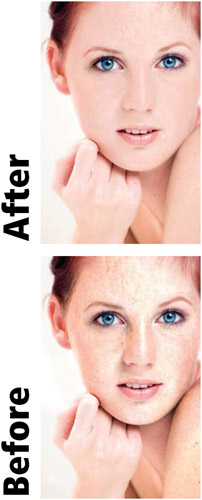
Technique 802: >> Decrease the appearance of freckles whilst still retaining the texture of the skin.

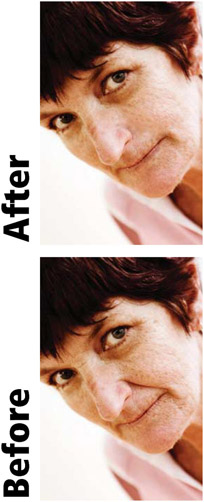
Technique 803: >> Remove wrinkles and skin blemishes without destroying the realism of the photo.

Visual Surgery without a Hint of Anything Plastic

So with this in mind, I present here a few of the basic techniques that are used by portrait photographers on a daily basis. Most work with, rather than paint over, the basic structure and...

UNLIMITED FREE
ACCESS
TO THE WORLD'S BEST IDEAS

SUBMIT
Already a GlobalSpec user? Log in.

This is embarrasing...

An error occurred while processing the form. Please try again in a few minutes.

Customize Your GlobalSpec Experience

Category: Professional Photography and Videography Services
Finish!
Privacy Policy

This is embarrasing...

An error occurred while processing the form. Please try again in a few minutes.