Advanced Photoshop Elements 6 for Digital Photographers

Chapter 7: Darkroom Techniques on the Desktop

Overview

Once you have mastered the basic editing and enhancement skills and techniques in Elements you will no doubt want to move on to some more challenging tasks that will extend and build upon what you already know. The group of techniques collected together here is loosely based on traditional photographic know how that I have reworked in a digital fashion.

7.01 Diffusion printing

Suitable for Elements 6, 5.0, 4.0, 3.0, 2.0, 1.0 Difficulty level Intermediate Resources Web image 701

Tools used Eraser Menus used Filter, Layer

Even though as image-makers we spend thousands of dollars on equipment that ensures that we make sharp photographs, there is something enticing about a delicately softened picture. Especially when this lack of sharpness is contrasted against a wellfocused section of the picture. Diffusion printing is one traditional printing technique that played with this idea. Parts of the image were purposely blurred whilst other areas remained sharp.

With non-digital photography, adding such an effect meant placing a mist or fog filter in front of the camera lens at the time of shooting. More recently, in an attempt to gain a little more control over the process, photographers have been placing diffusion filters below their enlarging lenses for part of the print s exposure time. This process gave a combination effect where sharpness and controlled blur happily coexisted in the final print.


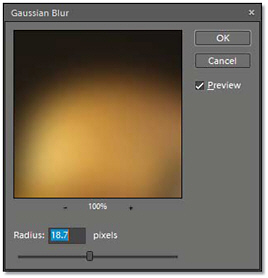
Gaussian Blur filter >> The diffusion printing technique is based around the careful application of...

UNLIMITED FREE
ACCESS
TO THE WORLD'S BEST IDEAS

SUBMIT
Already a GlobalSpec user? Log in.

This is embarrasing...

An error occurred while processing the form. Please try again in a few minutes.

Customize Your GlobalSpec Experience

Category: Commercial Printing Services
Finish!
Privacy Policy

This is embarrasing...

An error occurred while processing the form. Please try again in a few minutes.