Instant DVD Workshop 2.0

Featuring carefully detailed screenshots and step-by-step instructions, this Instant guide will show you how to create DVDs with Ulead software in a concise, time-efficient way.
 TABLE OF CONTENTS
 The final step in the DVD authoring process consists of checking the operation of your project and outputting it in your format of choice.
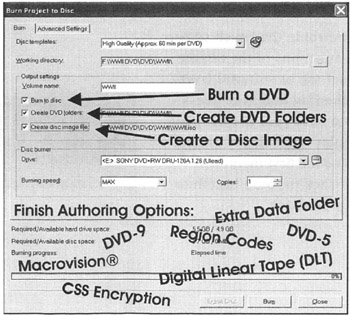
This may be a single layer DVD-5 disc, a dual layer DVD-9 disc, or a digital linear tape (DLT). In addition, Macrovision copy protection, CSS encryption, region codes, and an extra data folder may be added to your final burned DVD.
Although you may preview titles in the Edit Preview window or menus in the Menu Preview window, only the Finish Preview window allows you to immediately check all of the titles, menus, buttons, and other features in your completed project. The aspect ratio is always set to 16:9 whether the files are 4:3 or 16:9. This will not stretch 4:3 video to the 16:9 aspect ratio, it merely displays the video as 4:3 within the widescreen display.
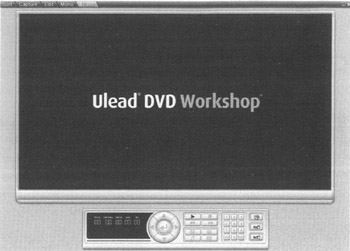
The remote control in the Finish screen simulates the functions of the remote control for a set-top or software DVD player. Click the Play button or press the spacebar to start your project playing. The first-play video (if the project includes one) or the first menu will begin to play. Click the Stop button or press S to stop playback.
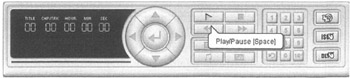
The left portion of the remote control displays the title (for DVDs), chapter, time, audio track, and subtitle track information. In this example, Chapter 2 of Title 2 (its position in the Title List) is 12 seconds into play. Audio...