Instant DVD Workshop 2.0

Featuring carefully detailed screenshots and step-by-step instructions, this Instant guide will show you how to create DVDs with Ulead software in a concise, time-efficient way.
 TABLE OF CONTENTS
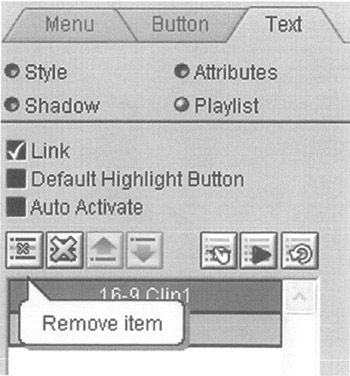
 A playlist is a group of actions that will be carried out in sequence from the top of the list to the bottom when a Menu button is selected. Each Menu button has its own unique playlist. When the Menu button associated with the playlist shown is selected, Chapter 4 of Video Title 1 will play, and then Menu 03 will play. Graphics-button playlists are located in the Button tab, while text-button playlists are located in the Text tab.
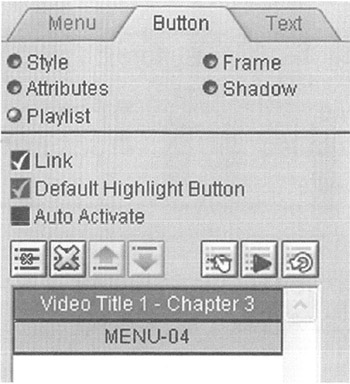
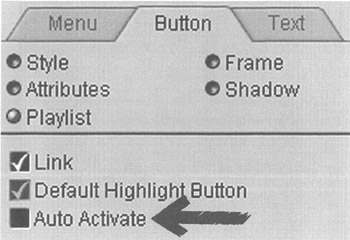
The Default Highlight Button checkbox allows you to select which menu button in a menu will be activated when the menu times out or or the after loop function occurs. Select the button you wish to use for this action and click the checkbox to set the default highlight button. Remember that only one button on each menu may have this option selected.
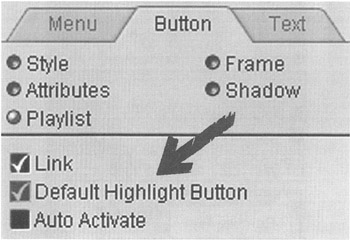
When Auto Activate is selected for a menu button, that button will be activated when the cursor rolls over the button. This feature is most commonly used for next and previous menu page buttons.
To remove an action from the playlist, first select the action to be removed by clicking on it. Selecting the small X icon near the left of the Playlist Options panel will remove the action. Select the large X icon to remove all actions from the playlist.