Artificial War: Multiagent-Based Simulation of Combat

Appendix E: A Concise User s Guide to EINSTein

Overview

The main menu (see top of figure D.3) consists of nine menu options:

  • File. Provides data file load/save and print options.

  • Edit. Provides dialogs to edit agent, terrain and various run-time parameter values

  • Simulation. Provides various run options.

  • Display. Provides options for manipulating the battlefield display screen.

  • On-the-Fly Parameter Changes. Provides dialogs to make on-the-fly parameter changes to various agent parameters.

  • Data Collection. Toggles data collection on/off and sets individual data collection flags.

  • Data Visualization. Provides dialogs for displaying time-series, mission-fitness landscape and genetic algorithm progress plots for collected data.

  • Window. Provides basic window display options.

  • Help. Provides on-line help screens.

The selections available under each of these menu options are described in detail below.

E.1 File Menu

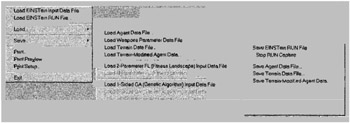
The File Menu contains basic file input/output options. See figure E.1.


Fig. E.1: EINSTein s main-menu File options (for versions 1.0 and older).

E.1.1 Load

E.1.1.1 Load EINSTein Input Data File

Loads EINSTein s Input Data File, and initializes EINSTein s Core Engine for an interactive run.

E.1.1.2 Load EINSTein RUN-file

Loads a RUN-File (i.e., a previously stored interactive run; see Simulation Menu::Run Modes) for fast playback. This option can also be selected by pressing the button on the toolbar.

E.1.1.3 Load Agent Data File

Loads EINSTein s Combat Agent Input Data File. The agent file defines the initial spatial disposition of red and blue agents, and overrides the definition of initial agent-block placements as defined in EINSTein s main input...

UNLIMITED FREE
ACCESS
TO THE WORLD'S BEST IDEAS

SUBMIT
Already a GlobalSpec user? Log in.

This is embarrasing...

An error occurred while processing the form. Please try again in a few minutes.

Customize Your GlobalSpec Experience

Category: Computer-Aided Design (CAD) Services
Finish!
Privacy Policy

This is embarrasing...

An error occurred while processing the form. Please try again in a few minutes.