3D Graphics ReferencePoint Suite

Create basic 3D geometry, presentations, and animations and implement NURBS modeling in 3-D Studio Max.
 TABLE OF CONTENTS
 The worlds created using the Adobe Atmosphere builder are stored on the local computer. You need to publish them and upload them to a Web server to enable other end users to access them. You can also create links in a 3-D world to Web pages and other resources.
This ReferencePoint explains how to publish worlds, connect multiple worlds using gateways, and create links to Web pages in worlds. It also explains how to create 3-D models, called avatars.
The Adobe Atmosphere builder provides various features and options to create objects on which you can apply various textures and lighting effects in a world.
When you save a world, the Atmosphere builder creates an .aer extension file, which contains information about the structure and the lighting in the world. It also contains linking and mapping information for the textures used in the world. End users can access a world using the Atmosphere player or browser plug-in.
| Note | Local worlds are worlds that are stored on your computer. |
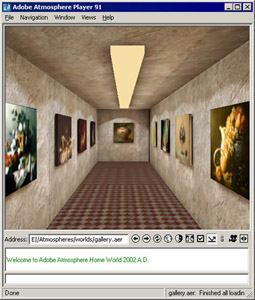
To open a world stored on your computer using the Atmosphere player, select File -> Open from the menu bar and select the file you want to view in the Open dialog box. Figure 4-2-1 shows a world opened in the Atmosphere player:
To open local worlds in the browser plug-in, you need to embed the world in an .html extension page. Type the path of the...