3D Graphics ReferencePoint Suite

Create basic 3D geometry, presentations, and animations and implement NURBS modeling in 3-D Studio Max.
 TABLE OF CONTENTS
 Adobe Atmosphere Builder is a tool to create three-dimensional environments called worlds. You can host these worlds on the Internet for other end users to access them. The worlds consist of objects. Atmosphere builder provides features that you can use to create and manipulate objects within a world.
This ReferencePoint explains how to use the various tools in the Atmosphere Builder to edit objects within a world. It also explains how to use the Object Inspector and Objects palette to manipulate the characteristics of objects.
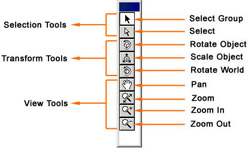
Atmosphere builder provides a toolbox, by default located in the upper-left corner of the builder interface. The Atmosphere builder toolbox contains nine tools. The tools are divided into three categories:
Selection tools: Enable you to select objects and groups of objects within a world.
Transform tools: Enable you to change the size of objects and rotate the position of objects within a world. They also allow you to rotate the entire world.
View tools: Enable you to magnify, shrink, and pan your view of the world.
Figure 4-3-1 shows the Atmosphere builder toolbox with various tools that you use to edit objects in a world:
The Tool Inspector palette provides options for toolbox items. When a tool does not have any options, the Tool Inspector palette remains empty. The Tool Inspector palette also provides options for the selection tools. To display the Tool Inspector, as shown in Figure 4-3-2, select Window->...