Applied Inventor

Learn to Use the Wireframe Viewing Command

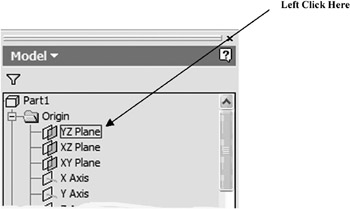
  1. Move the cursor to the lower left portion of the screen and left click on the text YZ Plane in the part tree as shown in Figure 26.


    Figure 26

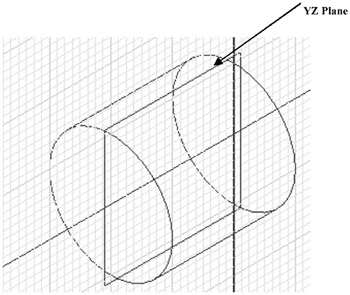
  2. Notice the YZ plane becoming visible through the part as shown in Figure 27.


    Figure 27

UNLIMITED FREE
ACCESS
TO THE WORLD'S BEST IDEAS

SUBMIT
Already a GlobalSpec user? Log in.

This is embarrasing...

An error occurred while processing the form. Please try again in a few minutes.

Customize Your GlobalSpec Experience

Category: Computer Mice and Pointing Devices
Finish!
Privacy Policy

This is embarrasing...

An error occurred while processing the form. Please try again in a few minutes.