AutoCAD 2002 ReferencePoint Suite

Use this ReferencePoint Suite for creating drawings, imaging and modeling, storing data with graphics, plotting, using dimensions and customizing AutoCAD 2002.
 TABLE OF CONTENTS
 AutoCAD 2002 is the latest release in the AutoCAD series. In this release, you can start a new project using the options available in the AutoCAD 2002 Today window. This window automatically appears on the screen when you start AutoCAD 2002.
You can also set the drawing environment in the new AutoCAD file by modifying the parameters such as the units for measuring linear and angular dimensions, limits of the drawing, grid and snap settings, object snap settings, and so on.
This ReferencePoint discusses the tools available for starting a new drawing project in AutoCAD. It also discusses the methods to set the AutoCAD environment by modifying various parameters.
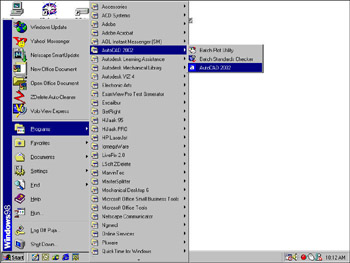
Start AutoCAD by double-clicking the AutoCAD 2002 icon available on the desktop of your computer. You can also start AutoCAD using the taskbar options from the Start menu. To start AutoCAD, click Start->Programs->AutoCAD 2002->AutoCAD 2002 from the menu, as shown in Figure 3-1-1:
When starting AutoCAD, the AutoCAD 2002 Today window appears on the screen. Select the Create Drawings tab from the My Drawings area, if not selected by default. You can select the option to start a new AutoCAD project from the Select how to begin drop-down list. This drop-down list shows the options to start a new AutoCAD project, as shown in Figure...








