AutoCAD 2002 ReferencePoint Suite

Use this ReferencePoint Suite for creating drawings, imaging and modeling, storing data with graphics, plotting, using dimensions and customizing AutoCAD 2002.
 TABLE OF CONTENTS
 Drafting tools in AutoCAD 2005 allow you to create drawings. AutoCAD 2005 provides new features, such as enhanced tools that help improve the drafting quality of drawings, and fields and tables, which allow you to insert text in your drawings in an organized manner.
This ReferencePoint explains the new features of AutoCAD 2005.
Tool palettes contain tools that you use to create drawings. AutoCAD 2005 provides the Tool Palettes window that contains several tool palettes as tab pages. The Tool Palettes window helps organize tools in the tool palettes.
To reuse graphic objects in AutoCAD 2005, you can create tools from objects, which you have created on the work area. To create tools from objects:
Select an object, which you want to use to create a tool. Figure 6-1-1 shows an object selected to create a tool:
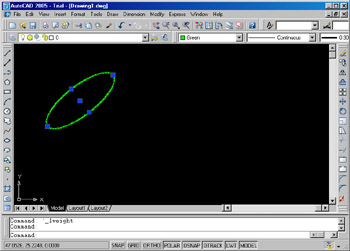
Figure 6-1-1: Selecting an Object to Create a Tool
Select Tools -> Tool Palettes Window to open the Tool Palettes window. The Tool Palettes window contains several tool palettes, as shown in Figure 6-1-2:
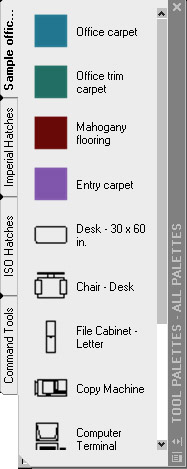
Figure 6-1-2: The Tool Palettes Window
Drag the selected object from the work area to the tool palette where you want to place the object as a tool. Figure 6-1-3 shows the tool created in a tool palette: