AutoCAD 2002 ReferencePoint Suite

Use this ReferencePoint Suite for creating drawings, imaging and modeling, storing data with graphics, plotting, using dimensions and customizing AutoCAD 2002.
 TABLE OF CONTENTS
 AutoCAD is used to develop technical drawings in various fields of engineering. A drawing in AutoCAD contains several objects that can be inserted in other drawings. AutoCAD enables you to store objects as blocks that can be reused. It also enables you to retrieve data from an external database and link the data to the objects in a drawing.
This ReferencePoint describes how you can retrieve data from an external database and link the data to the objects in an AutoCAD drawing.
Blocks are used to store reusable drawing objects. By using blocks, the size of the drawing file is considerably reduced because AutoCAD stores blocks as references. When a block is inserted in a drawing, AutoCAD refers to the block instead of storing the entire object.
Before blocks are created, you must first create an object that needs to be stored as a block. To create a block:
Create an object in the drawing area of AutoCAD, as shown in Figure 4-2-1:
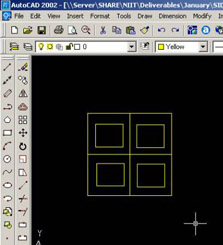
Figure 4-2-1: The Drawing Area of AutoCAD
Select Draw-> Block-> Make from the AutoCAD main menu, as shown in Figure 4-2-2:
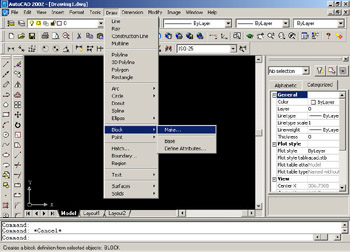
Figure 4-2-2: Selecting the Make Option
The Block Definition dialog box appears, as shown in Figure 4-2-3. Click Select objects to select an object in the drawing area.
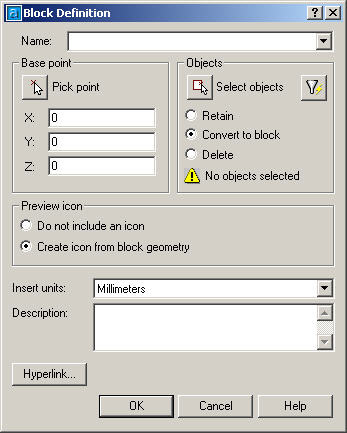
Figure 4-2-3: The Block Definition Dialog Box
The Block Definition dialog box disappears and a square pointer appears in the drawing area that enables you to select objects. Double-click the object...