Configuring Symantec AntiVirus, Corporate Edition
Whether you are managing an existing NAVCE 7.6 configuration or implementing SAVCE version 8.x, this book will help you get the most out of your software installation.
 TABLE OF CONTENTS
 Thus far, you have learned about known problems. Inevitably, a problem will arise that has never really been documented before. Fortunately, Symantec does a pretty good job of keeping its documentation current. The best way to access current information is to access its Knowledge Base Web site. Here, you can learn about:
The latest bugs in NAVCE
Critical updates
Techniques for improving your NAVCE environment
You can access all areas of the Knowledge Base, as well as additional areas of Symantec s Web site by going to the following URL: www.symantec.com/_search/.
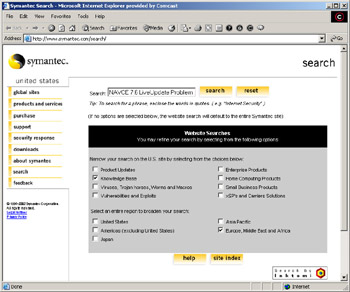
From this URL, you have the option of conducting searches concerning any particular Symantec product, including NAVCE. Once you load the search page, you will be able to:
Enter text strings to search for relevant information, much like how you would in Google, Altavista, or any other search engine
Conduct searches using specific Knowledge Base article numbers (for example, 810907)
Limit your search to only the Knowledge Base
Determine specific regions you wish to search
Figure 11.25 shows an example of a NAVCE search that targets only Knowledge Base articles found in the Europe, Middle East, and Africa region.
When conducting a search, consider using words and phrases such as:
NAVCE
Norton AntiVirus Corporate Edition
Troubleshooting
NAVCE Troubleshooting
NAVCE XP (or any other reference to an operating system)
Other Symantec search engines are available for a variety of tasks:
If you wish to receive a broad...