Final Cut Pro 3 Editing Workshop, Second Edition
Become an FCP software editing pro with this hands-on reference.
 TABLE OF CONTENTS
 There are two Borders:
Basic
Bevel
It s important to note that these Borders both cut into the image. They do not extend the borders around the bounding box of the image. They re a nice touch to Picture-in-Picture effects (PIPs) and can be used to mask those nasty black edges we talked about in the previous lesson. If you really do need the maximum size of your frame, you could nest the image in a sequence with a slightly larger frame size and then apply the Border in the final sequence, using the extra size as room for either a Basic or Bevel filter.
As basic as it gets: it just adds a colored border. The controls give you a color picker and the Border Amount. The default value of 5 is very thin. You ll probably want to push it up a bit. Oddly, there is no opacity control or fade control for the border; you can t do a feathered inner edge.
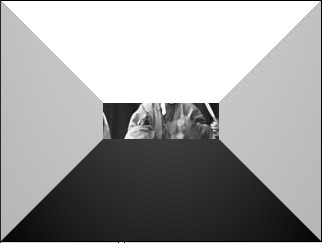
Strangely , Bevel does have an Opacity controller. I would have thought it would be the other way around Basic had opacity, while Bevel didn t. If you max out the bevel width, you ll fill your image with a pyramid-like effect (Figure 11.9), which might make an interesting reveal for someone.
The color picker is called Light Color, like the color of a gel a...