Final Cut Pro 3 Editing Workshop, Second Edition
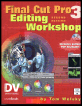
Become an FCP software editing pro with this hands-on reference.
 TABLE OF CONTENTS
 The Image Control group of filters is now largely made up of a legacy collection of filters, remnants left behind to be used on older projects. For all practical purposes, when working on a new project, for most of what you might want to do, you will be better served using the Color Correction filters that we looked at in the previous lesson. There are eight filters in the Image Control menu:
Brightness and Contrast
Color Balance
Desaturate
Gamma Correction
Levels
Proc Amp
Sepia
Tint
Of these, only Desaturate and Sepia serve much purpose, and only that of speed, for quick and dirty work. Brightness and Contrast and Color Balance should certainly either be done with Color Correction, or with FXScript DVE s Brightness and Contrast, if you want its special split-screen feature. Gamma Correction and Levels can be controlled far better with Color Correction, and the Proc Amp controls are too restricted to be very useful. Tint was pretty useless in the first package because Sepia did whatever Tint could do any way.
This is still the quickest, easiest way to remove color. The default Amount of 100 is a fully desaturated image, pure black and white. I find it makes a somewhat flat-looking black and white. Desaturate does not only de-, it will also over-. Desaturate can go into negative values, which overchromas the image. It won t take much of a...