Final Cut Pro 3 Editing Workshop, Second Edition
Become an FCP software editing pro with this hands-on reference.
 TABLE OF CONTENTS
 The FXScript Layered DVE s are a collection of filters based on ten of the FXScript transitions we saw earlier, specifically:
Band Slide
Page Peel
Page Peel 1/2
Page Peel 1/4
Slide
Split Slide
Stretch
Swing
Zoom/Rotate
Usually the filters work exactly the same as the transitions, except that they work on a single clip and that they are keyframable, allowing the effect to stop and hold or go back and forth any number of times. The controls for these filters are the same as the controls provided in their transition counterparts.
Band Slide lets you split the screen horizontally or vertically, from two to up to 10 bands, not as many as the 30 available in the transition. An Amount slider controls how far into the effect you want to set it at any moment in the Timeline.
The Page Peel effects have the same controls as the transitions they share names with. Page Peel can be used effectively to dog- ear an image to place a chapter marker behind a corner for instance as in Figure 11.37.
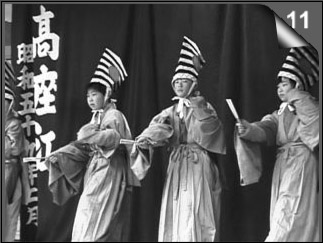
The Amount slider is set very low, as is the Radius value. This makes a very tight peel that shows the back very quickly. It wouldn t work well for most transitions, where you d use a much higher Radius to make the image peel back...