Final Cut Pro 3 Editing Workshop, Second Edition
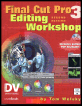
Become an FCP software editing pro with this hands-on reference.
 TABLE OF CONTENTS
 The six Channel effects allow you an amazing degree of control of color and compositing. We ll look more closely at compositing in Lesson 12 on page 509, but here the Channel effects allow you to combine clips and apply color effects to them combined with compositing modes.
This is a basic Channel effect. It composites a color, which can be animated, to any one of the color channels R, G, or B, or all three combined, using one of the compositing modes on a popup (Figure 11.10).
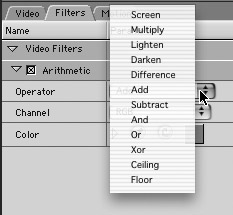
FCP calls them Operators, but they are really compositing modes. In the Arithmetic sequence in your Browser, I have laid out a short clip of Dance3 12 times. Each clip has a different Operator mode applied to its RGB value using the default color, gray. Look through these to get a basic idea of how the Operators work. Most of the Operators such as Add, Subtract, Darken, and Lighten are commonly known, but there are a couple of unusual Operators, Ceiling and Floor, that produce interesting results. Remember these are only compositing with the color you select, not with the anything else.
I confess I can t tell you what this effect gives you that multiple copies of Gaussian Blur don t already, except the ability to blur more than one channel at a...