Final Cut Pro 3 Editing Workshop, Second Edition
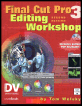
Become an FCP software editing pro with this hands-on reference.
 TABLE OF CONTENTS
 There is no right way to edit a scene or a sequence or even a whole film or video; there are only bad ways, good ways, and better ways. In this lesson we re going to look at some video and edit it. I m going to give you a number of different ways of working with it and a few different ways to cut it up I call them Slice and Dice.
Start by loading the CD that came with this book into your CD drive. Open the CD.
You ll see two folders, one called Media1 and another called Projects. Inside Media1 is a QuickTime file and inside Projects are numbered Lesson folders. You ll notice that some of the lessons don t have folders, such as Lessons 1 and 2.
To start, drag the folder called Media1 onto your media drive.
This may take a while. It contains the video material used in this book. When you begin any lesson that needs material from the CD, the first step you should take is to drag the media folder onto the media drive of your computer. The clips included there will play much better and more smoothly from your high-speed drive than from any CD drive.
When that s finished, drag the folder Lesson 3 from the Projects folder on the CD onto the system hard drive of your computer. You should probably place it in the Shared folder inside your...