Final Cut Pro 3 Editing Workshop, Second Edition
Become an FCP software editing pro with this hands-on reference.
 TABLE OF CONTENTS
 The FXScript DVE s and the FXScript Layered DVE s were written by Klaus Eiperle and sold as a separate plugin package until Apple included them in FCP3. Klaus has a new collection of effects, Volume II; a demo version with small QuickTime clips is included in the Extras folder of the CD.
A garbage matte allows you to roughly cut out a section of the image by selected points on the screen that define the four corners of the picture. It works similarly to the Distort tool, except that instead of twisting the image, you cut it. There is a legacy FCP Four-point Garbage Matte as well, but this one has superior capabilities. FCP also has an Eight-point Garbage Matte, which we ll look at shortly.
The controls in 4-point Garbage Matte allow you to set four points on the image, beginning with Point 1 in the upper left corner, Point 2 in the upper right, Point 3 in the lower right, and finally Point 4 in the lower left (Figure 11.24).
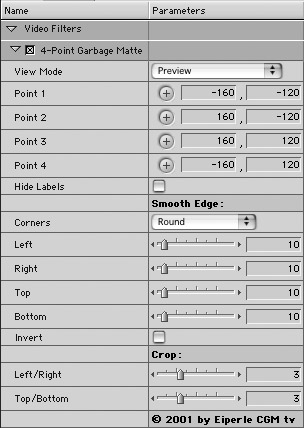
To make a diagonal, for instance, you would think I could simply move Point 3 over to where Point 4 is, cutting the screen from the upper right to lower left, as in Figure 11.25. FCP s Four-point Garbage Matte would do it like that, but because of the greater control available in FXScript s