Including complex operations and formulas that are explained in an easy-to-understand format, this book provides the solutions to some of the most complex problems in chemical process design.
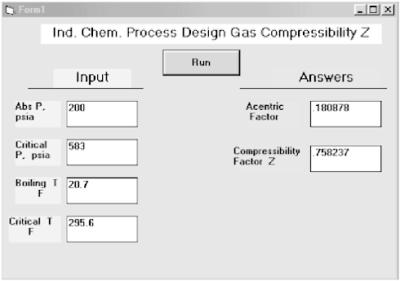
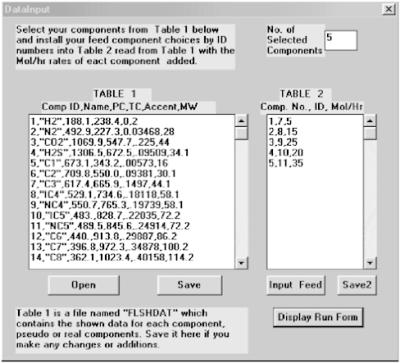
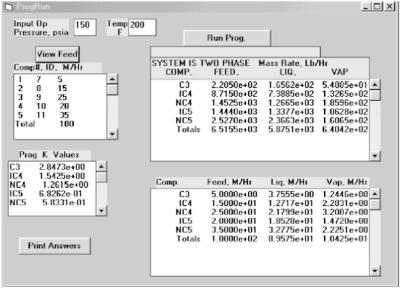
Figure B.1: Gas Compressibility Z dialog box. Insert your input in the squares on the left. Use the mouse to locate the input square. Left-click Run and your answers appear in the squares on the right.Please note that you may obtain the same values simply by clicking on Run before you make any inputs. These are the defaulted values made in the program code. To bring up any program, simply double-click on the Z.exe file in the CD accompanying this book. Please note that you may load this file to any file location desired. Please be advised that you must also load Vbrun300.dll to the same file location for any Visual Basic .exe program to run.
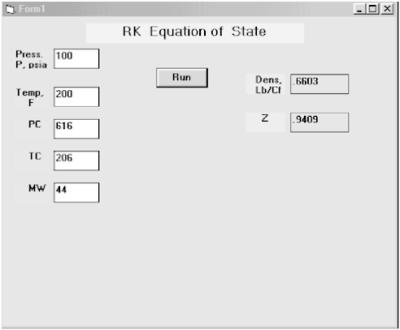
Figure B.2: RK Equation of State dialog box. The white squares are data input squares. This program is RK.exe, and all the same notes apply to it as for Fig. B.1 and all other .exe programs provided with this book.
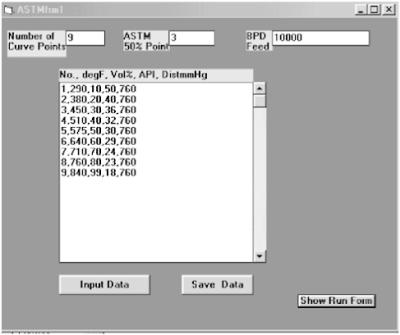
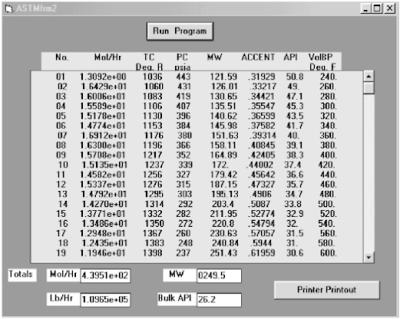
Figure B.3: Crude oil characterization.1. Install the number of ASTM curve points you have.2. Install the 50% number point of your data, or a best estimate.3. Next install the point number, the ASTM F value, the corresponding API gravity value, and the pressure value of the ASTM distillation as shown on each of the lines in the large center input square. Please note that each value is separated by a comma.4. Click on Input Data, then click on Save Data, and last click on Show Run Form.
Figure...
Copyright The McGraw-Hill Companies, Inc. 2002 under license agreement with Books24x7