Mastering Autodesk VIZ 2007

You have seen how you can map materials to objects by generating mapping coordinates (in the case of Primitives, this is built-in) and by applying the UVW Map modifier. You have also seen how to fine-tune the tiling of a bitmap in the Coordinates rollout in the Material Editor. However, there is another way to approach the issue of mapping materials that is to use one of the Map Scalar modifiers.
| Tip | In most cases, Map Scalars can be used to simplify the issue of mapping. Use the other options if you want greater control, but try Map Scalar first, it usually works great. |
The Map Scalar Object Space modifier (OSM) provides a simplified way to map materials that will scale with the object. The older Map Scalar World-Space modifier (WSM) is also available for those occasions when you want the map size to be bound to absolute world scale.
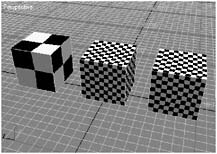
Open the sample file Mapping.max (Figure 8.37) from the CD.
Figure 8.37: Mapping sample cubes
The sample file contains three 5 ? cubes that all share the same material. The applied material is using a Checker Diffuse Color map that is set to tile once in each texture direction, U and V. The pattern that is mapped then consists of four squares, alternating white and black, that make a larger square as seen in Figure 8.38.
Figure 8.38: The mapped pattern
Select the first cube on the left and switch to the Modify...