Mastering Autodesk VIZ 2007

To use the tutorials in this book, you ll want to be sure you ve installed most of the components that are available on the VIZ installation CD. This means that you ll need at least 500 MB of free disk space for the VIZ files alone. You will also need to install the additional map files from the second CD as well as the EASYnat and RPC plug-ins and their associated content files totaling about 100 MB. You may also want to install the tutorials, samples, and partner files from the Partners CD. This will require another 360 MB of space. In addition, you ll want to install the sample files from the companion CD for this book, which will require another 500 MB of space. All together, you will need between 500 MB and 1.5 GB of space on your hard drive, depending on the options you choose.
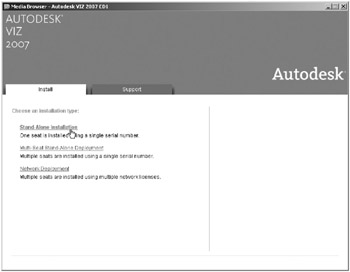
Installing VIZ is fairly straightforward. When you insert the first of the two VIZ discs into your CD-ROM drive, the Windows Autorun feature will automatically start the installation program on the VIZ CD. If Autorun is disabled, open Windows Explorer and double-click the startup application ( setup.exe) on the first VIZ CD. The initial installation screen is where you choose whether the installation is for a single stand-alone installation or a multiseat stand-alone installation or whether VIZ will be installed remotely from a network location as shown in Figure A.1.
In the next...