SystemVerilog for Verification: A Guide to Learning the Testbench Language Features
Chapter 7: Threads and Interprocess Communication

7.1 Introduction

In real hardware, the sequential logic is activated on clock edges, while combinational logic is constantly changing when any inputs change. All this parallel activity is simulated in Verilog RTL using initial and always blocks, plus the occasional gate and continuous assignment statement. To stimulate and check these blocks, your testbench uses many threads of execution, all running in parallel. Most blocks in your testbench environment are modeled with a transactor and run in their own thread.

The SystemVerilog scheduler is the traffic cop that chooses which thread runs next. You can use the techniques in this chapter to control the threads and thus your testbench.

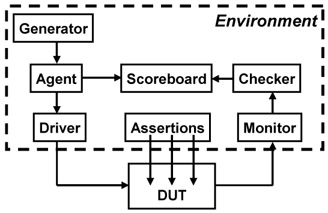
Each of these threads communicates with its neighbors. In Figure 7-1, the generator passes the stimulus to the agent. The environment class needs to know when the generator completes and then tell the rest of the testbench threads to terminate. This is done with interprocess communication constructs such as the standard Verilog events, event control and wait constructs, and the SystemVerilog mailboxes and semaphores. [10]


Figure 7-1: Testbench environment blocks

[10] . The SystemVerilog LRM uses "thread" and "process" interchangeably. The term "process" is most commonly associated with Unix processes, in which each contains a program running in its own memory space. Threads are lightweight processes that may share common code and memory, and consume far less resources than a typical process. This book uses the term "thread." However, "interprocess communication" is such a common term that it...

UNLIMITED FREE
ACCESS
TO THE WORLD'S BEST IDEAS

SUBMIT
Already a GlobalSpec user? Log in.

This is embarrasing...

An error occurred while processing the form. Please try again in a few minutes.

Customize Your GlobalSpec Experience

Category: Thread Rolling Dies
Finish!
Privacy Policy

This is embarrasing...

An error occurred while processing the form. Please try again in a few minutes.