Project Planning and Control Using Primavera Contractor Version 6: Including Versions 4.1, 5.0 and 6.1
15.5: Updating the Schedule

15.5 Updating the Schedule

The next stage is to update the schedule by entering the mark-up information against each activity.

When dealing with large schedules it is normal to develop a look-ahead schedule by creating a filter to display incomplete and un-started activities commencing in the near future only.

The schedule may be updated using the following methods:

  • Using the fields in the Status tab of the Details form in the lower pane, or

  • Displaying the appropriate tracking columns by:

    • Creating your own layout, or

    • Inserting the required columns in an existing layout.

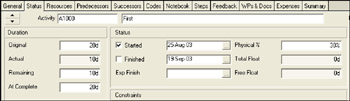
15.5.1 Updating Activities Using the Status Tab of the Details Form

Open the Status tab:

Updating a Complete activity:

  • Check the Started box and enter the actual Start Date and Time if different from the displayed date.

  • Check the Finished box and enter the actual Finish Date and Time if different from the displayed date.

Updating an In-progress activity:

  • Check the Started box and enter the actual Start Date and Time if different from the displayed date.

  • When the Duration Type is % Duration the % Duration Complete and Remaining Duration are linked, either:

    • The Remaining Duration is edited and the % Complete is calculated, or

    • The % Complete is entered and the software calculates the Remaining Duration, or

    • A Remaining Duration greater than the Original Duration may be entered and the % Duration will...

UNLIMITED FREE
ACCESS
TO THE WORLD'S BEST IDEAS

SUBMIT
Already a GlobalSpec user? Log in.

This is embarrasing...

An error occurred while processing the form. Please try again in a few minutes.

Customize Your GlobalSpec Experience

Category: Flight Management Systems
Finish!
Privacy Policy

This is embarrasing...

An error occurred while processing the form. Please try again in a few minutes.