Project Planning and Control Using Primavera Contractor Version 6: Including Versions 4.1, 5.0 and 6.1
15.7: Suspend and Resume

15.7 Suspend and Resume

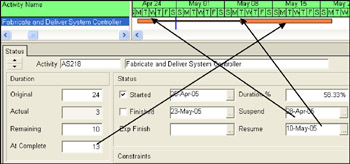
The Suspend and Resume function enables the work to be suspended and the activity resumed at a later date. Open the Activity Details form Status Details tab and enter the Suspend and Resume dates. This function works in a similar way to the P3 and SureTrak function and enables only one break in an activity.

The following example shows an activity suspended from 30 Apr 05 to the 10 May 05.

  • This feature works when a task has commenced and normally the Suspend date is in the past and the Resume date in the future.

  • The activity must have an actual start date before you can record a suspend date.

  • Only Resource Dependent and Task Dependent activities may be Suspended and resumed.

  • The suspended period is not calculated as part of the task duration and resources are not scheduled in this period.

    Information

    The Suspend and Resume time may be set at 00:00, the start of the day, when set without the time hidden. Therefore you may wish to display the time when setting Suspend and Resume dates to ensure that are correct.

UNLIMITED FREE
ACCESS
TO THE WORLD'S BEST IDEAS

SUBMIT
Already a GlobalSpec user? Log in.

This is embarrasing...

An error occurred while processing the form. Please try again in a few minutes.

Customize Your GlobalSpec Experience

Category: Suspended Growth Treatment Systems
Finish!
Privacy Policy

This is embarrasing...

An error occurred while processing the form. Please try again in a few minutes.