Project Planning and Control Using Primavera Contractor Version 6: Including Versions 4.1, 5.0 and 6.1
This chapter will look at the following topics:
User Preferences,
The Admin menu items,
Admin Preferences, a multi tab form under the Admin menu,
Advanced Scheduling Options, and
Admin Categories.
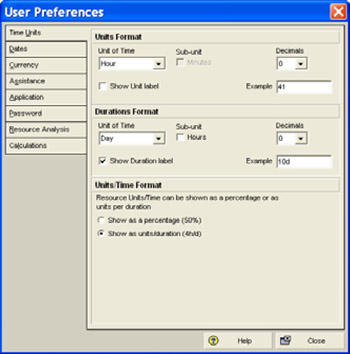
Select Edit, User Preferences to open the User Preferences form. This form is used to set up a number of user-defined parameters, which will determine how data is displayed.

The User Preferences form may also be opened by right-clicking in the right side of the bottom views when the Resource Usage Spread Sheet or Resource Usage Profile are being displayed.
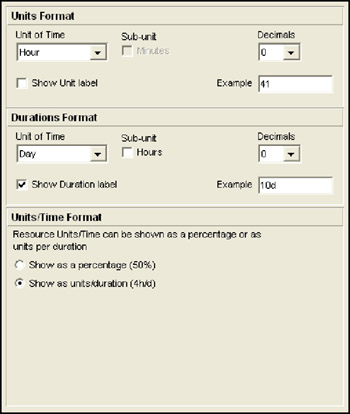
The Units Format section of the tab is used to define the format of the Unit of Time that resource assignments are displayed with, e.g. days or hours.
The Durations Format section of the tab is used to define the format of the Unit of Time that activity durations are displayed with, e.g. days or hours.

| Note | The Units Format and Durations Format apply to every Layout, Window and project. These factors will have to be continually changed when there are a number of projects and a number of resource analysis layouts with different display requirements. |
The Units/Time Format section of the form enables the Microsoft Project-type formatting options of Resource/Time Format to show Resource utilization as a percentage (50%) or as units per duration (4h/d).
The Hours per Time Period enables the user to specify how...