Project Planning and Control Using Primavera Contractor Version 6: Including Versions 4.1, 5.0 and 6.1

15.9: Comparing Progress with Baseline

15.9 Comparing Progress with Baseline

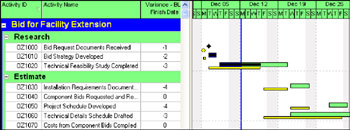
There will normally be changes to the schedule dates and more often than not there are delays. The full extent of the change is not apparent without having a Baseline bar to compare with the statused schedule.

To display one or more of the Baseline Bars in the Bar Chart you must open the Bars form and check the Display box of one or more baseline bar.

If you want to see the Start and Finish Date variances, they are available by displaying the Variance - Start Date and Variance - Finish Date columns. These variance columns use the Primary Baseline data.

Information

When a Project Baseline or a Primary User Baseline bar is displayed without a baseline being set the Current Schedule which is based on the Planned Dates will be displayed and the Current Schedule is not a true Baseline.

UNLIMITED FREE
ACCESS
TO THE WORLD'S BEST IDEAS

SUBMIT
Already a GlobalSpec user? Log in.

This is embarrasing...

An error occurred while processing the form. Please try again in a few minutes.

Customize Your GlobalSpec Experience

Category: Electronic Data Interchange Software (EDI)
Finish!
Privacy Policy

This is embarrasing...

An error occurred while processing the form. Please try again in a few minutes.