Project Planning and Control Using Primavera Contractor Version 6: Including Versions 4.1, 5.0 and 6.1

15.8: Scheduling the Project

15.8 Scheduling the Project

At any time, but usually after all the activities have been updated, the project is scheduled:

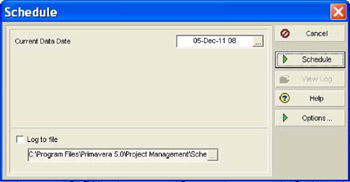
  • Open the Schedule form:

    • Select Tools, Schedule , or

    • Press the F9 key, or

    • Click on the button.

  • Select the revised Current Data Date from the box and click the button.

  • The software will recalculate all the early finish dates from the remaining durations and the new Current Data Date, taking into account the relationships and the Retained Logic/Progress Override Options.

UNLIMITED FREE
ACCESS
TO THE WORLD'S BEST IDEAS

SUBMIT
Already a GlobalSpec user? Log in.

This is embarrasing...

An error occurred while processing the form. Please try again in a few minutes.

Customize Your GlobalSpec Experience

Category: Scheduling Software
Finish!
Privacy Policy

This is embarrasing...

An error occurred while processing the form. Please try again in a few minutes.